Burn After Reading Links vs Disappearing Messages: Which Fits?
Choose a burn-after-reading link or a disappearing message by use case. See a tested one-time text lifecycle with 10-minute expiry and a 60-second viewing window.
In this guide
If you are searching for a burn-after-reading link, first decide whether you need a conversation or a one-time delivery flow.
Fast answer
Use the tool that matches what should disappear
Disappearing messages
Best when you are already chatting and replies or context matter.
One-time text links
Best for one short private note or temporary, replaceable password.
Temporary file sharing
Best for screenshots, PDFs, images, or small files instead of text-only delivery.
Short answer: choose a disappearing message inside an existing conversation, a one-time private link for a short piece of text, or temporary file sharing for images and files. They are related ideas, but not interchangeable workflows.
ClipShare Snap is built for the middle case: one-time private text. A Snap link expires 10 minutes after creation, and once revealed, the recipient has a 60-second viewing window. It is not intended for permanent credentials, private keys, recovery phrases, or anything that cannot be replaced.
Pick by use case, not by label
Many tools use similar words:
- self-destruct
- burn after reading
- view once
- disappearing message
- one-time secret
- temporary private note
Similar words do not mean the same workflow.
| Real need | Better fit |
|---|---|
| Disappearing photos or social messages | Snapchat or chat-app view-once media |
| Less message history inside an existing chat | Signal, Telegram, WhatsApp, or similar chat tools |
| Temporary password or one-time private note | One-time private link |
| Phone-computer file or text transfer | Online clipboard or temporary file sharing |
| Enterprise audit and access control | Password manager or internal access system |
ClipShare Snap is intentionally narrow: it is not a chat app. It is a one-time private text link.
If you are already chatting, chat tools may be better
Use a chat app when:
- the recipient is already a contact
- you will continue discussing the topic
- replies and context matter
- the message belongs in an ongoing thread
Disappearing messages or view-once media inside chat apps are useful because the relationship already exists.
They are not always ideal for "no account, no contact, just read this one short text."
For the social-tool angle, read ClipShare Snap vs Snapchat: Which One-Time Message Flow Fits?.
If you only need to send short text, a one-time link is lighter
Chat becomes heavy when:
- the recipient is not a contact
- the recipient does not want another app
- you do not want to create a chat relationship
- the content should only be seen once
- the raw text should not remain in chat history
Examples:
- starter passwords
- one-time access codes
- customer setup instructions
- short private notes
- temporary contractor instructions
In those cases, a one-time private link is more direct: create the link, send it, let the recipient reveal it, and let the content expire.
Tested burn-after-reading lifecycle in ClipShare Snap
For a one-time private text link, the useful evidence is not a promise that content "disappears." It is what the recipient actually sees before, during, and after reveal.
In this tested ClipShare Snap flow:
- The sender creates a one-time link for short text.
- The recipient reveals the message and the 60-second viewing countdown begins.
- After the reveal flow ends, the original message cannot be displayed again.
The link also expires 10 minutes after creation if it is never opened.
Real browser test: create, reveal, unavailable
1. Create a one-time private text link
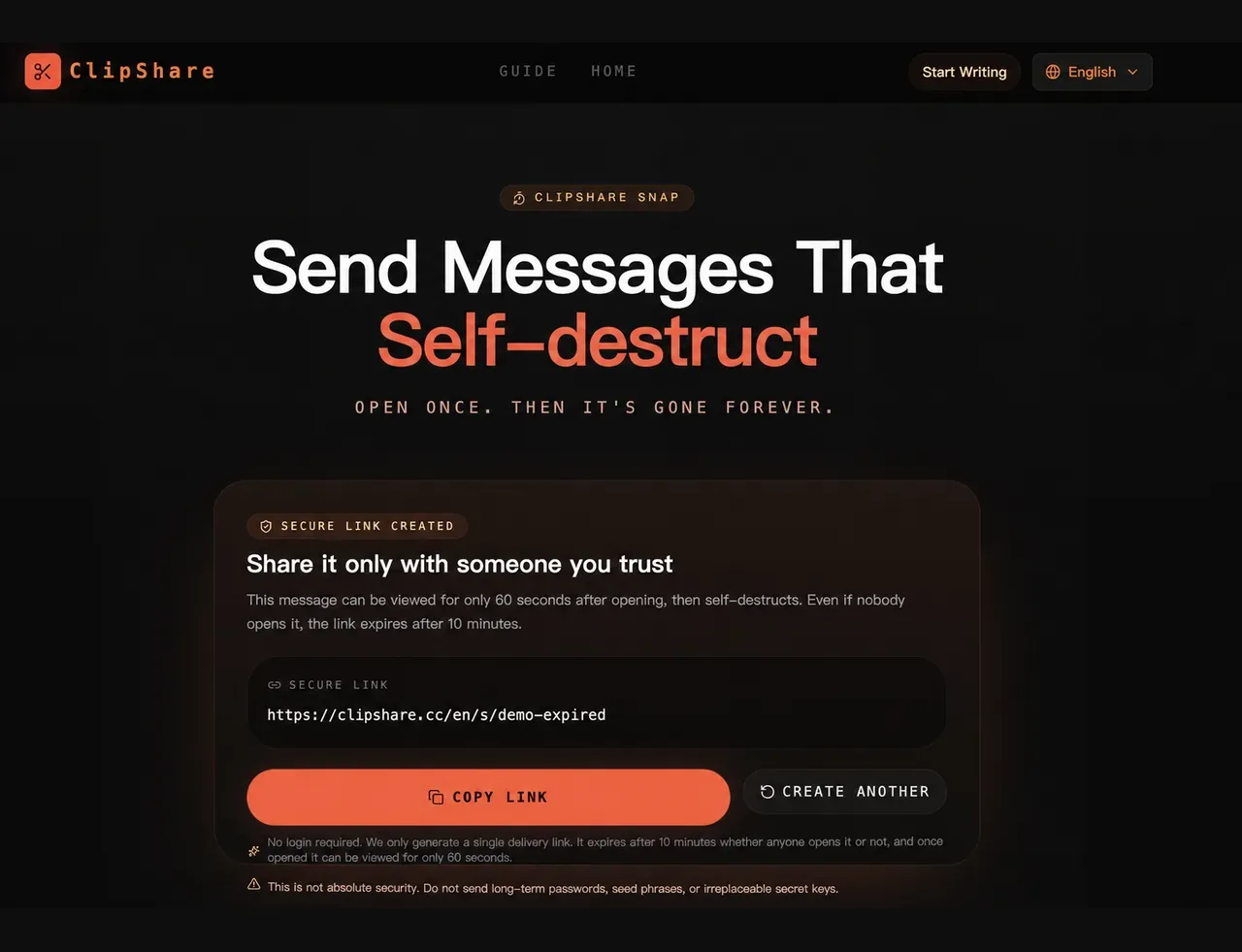
2. Reveal the text during the countdown window
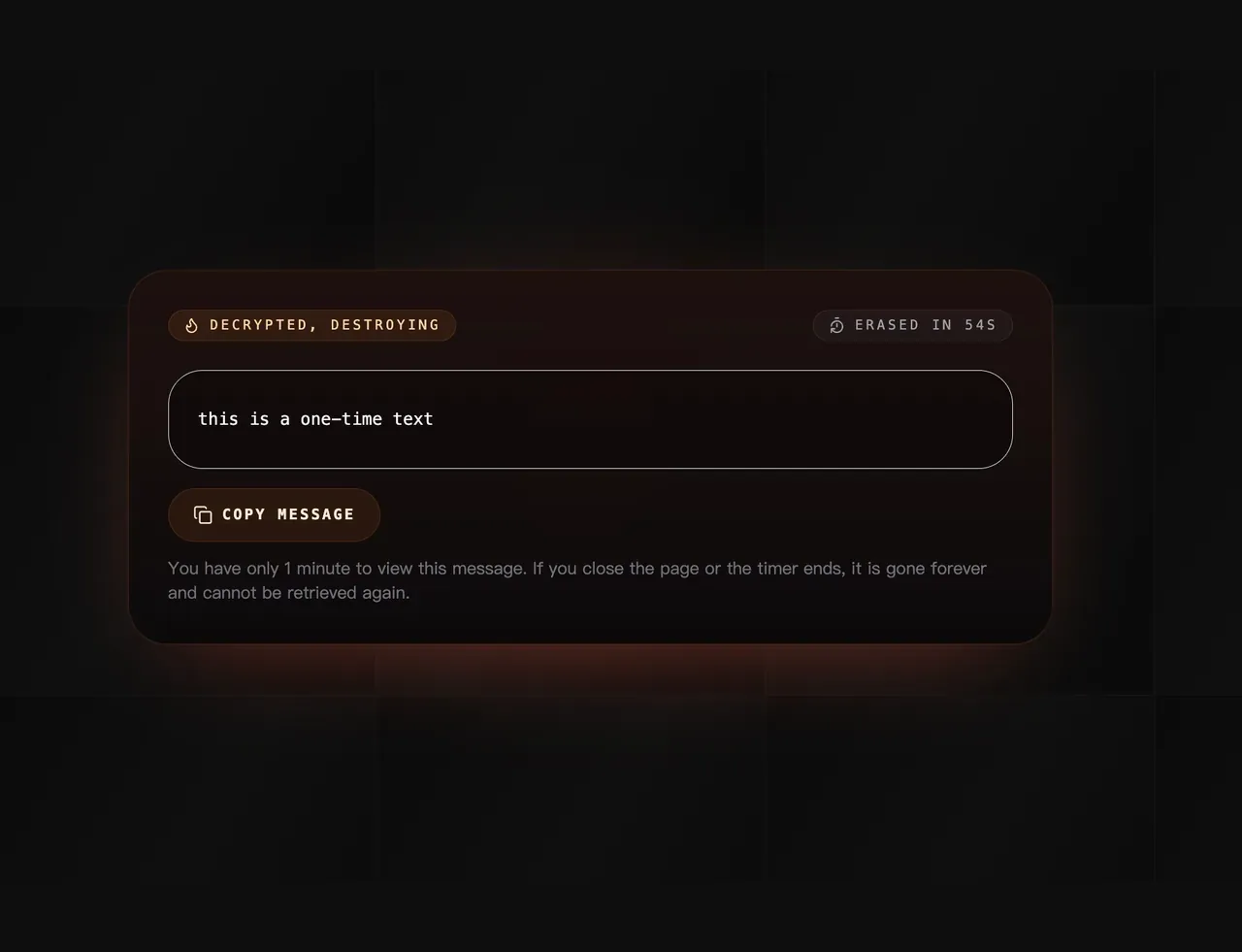
3. The message is no longer available afterward
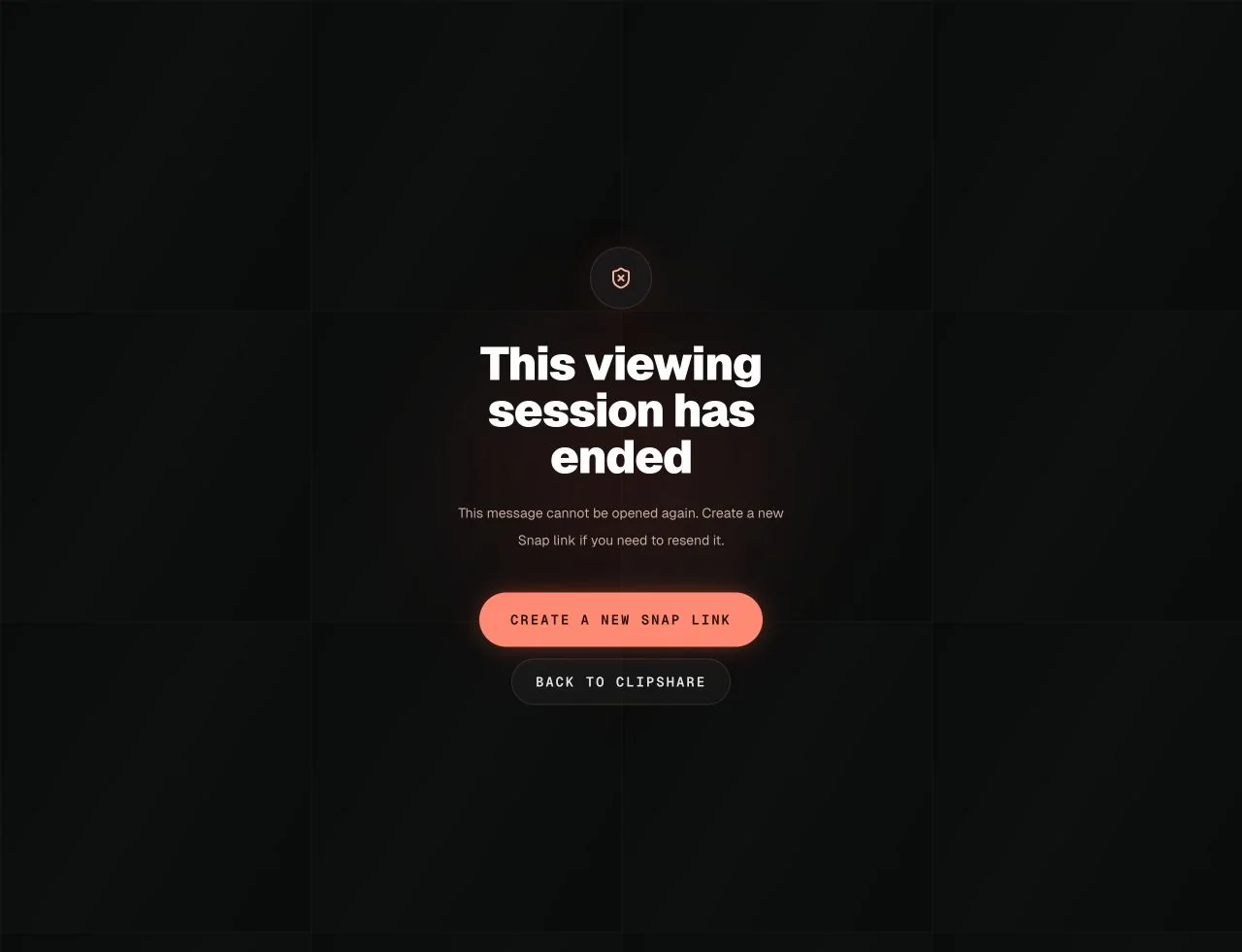
Tested lifecycle for temporary text: a link is created, the recipient reveals it inside the viewing window, and the content is no longer shown after the reveal flow completes. Demonstration link values are not active credentials.
For a broader comparison with One-Time Secret, PrivateBin, Privnote, and Yopass, see One-Time Secret vs PrivateBin vs ClipShare Snap.
If you need images or files, do not use a text-only Snap flow
Burn-after-reading does not mean every format belongs in the same tool.
ClipShare Snap is text-only. It is not designed for images, screenshots, or files.
If your real need is:
- phone screenshots to computer
- sending a small PDF
- letting someone view a document
- QR-code handoff between nearby devices
then normal ClipShare or temporary file sharing is the better category.
Read:
- Temporary File Sharing Without Login: Fast Cross-Device File Transfer
- What Is an Online Clipboard? How Browser Sharing Works
Five questions to choose the right tool
1. Does the recipient need an app?
For one short note, app installation is usually too much.
2. Do you need a contact relationship?
Temporary collaborators, customers, and weak-tie handoffs usually do not.
3. Does the content only need to be seen once?
If yes, normal chat history may retain too much.
4. Is the content replaceable?
One-time private links are best for temporary details that can be rotated or revoked.
5. Do you need audit or retention?
If yes, do not use burn-after-reading tools. That goal conflicts with disappearing content.
Frequently Asked Questions
What is a burn-after-reading link?
A burn-after-reading link is a short-lived access path intended to reveal content once and then make the original unavailable through that flow. Exact expiry and viewing rules depend on the tool. In ClipShare Snap, the link expires after 10 minutes, and a revealed message is viewable for 60 seconds.
Is a one-time link better than a disappearing message?
It depends on the task. Use a one-time link when you need to deliver a short private text without beginning a conversation. Use disappearing messages when the information belongs inside an existing chat with replies and context.
What happens after someone opens a ClipShare Snap link?
The recipient chooses to reveal the text. Once revealed, the 60-second viewing window begins; after that flow ends or the page is closed, the original message cannot be fetched again through Snap.
Does burn-after-reading mean it cannot leak?
No.
The recipient can still screenshot, photograph, copy, or paste the content elsewhere.
Is shorter always safer?
Not always.
A shorter exposure window can reduce risk, but it can also create mistakes. Fit matters more than drama.
Can I use a one-time link for any password?
No.
Use it only for temporary, replaceable passwords. Do not use it for permanent passwords, seed phrases, or private keys.
For password-specific guidance, read Is It Safe to Send Passwords in Chat? Temporary Passwords vs One-Time Links.
Bottom line
Do not choose a burn-after-reading tool by name alone.
Choose based on the job:
- ongoing conversation: use chat
- one-time private text: use ClipShare Snap
- temporary cross-device files: use normal ClipShare
- high-sensitivity permanent credentials: use a password manager or controlled access system
The closer the tool is to the real task, the less likely you are to misuse it.
What this guide verifies
This article distinguishes a short-lived or one-time handoff from durable secret management. Expiration and single retrieval reduce casual persistence, but they do not make a bearer link safe against forwarding, screenshots, compromised endpoints, or an unintended recipient.
Test setup and result
On July 26, 2026, ClipShare Team used production Chrome to create a Snap link with a synthetic 56-character text. The first fresh browser context retrieved the exact text; a second fresh context could not retrieve it again. No real password, personal data, or customer data was used.
This result verifies that observed one-time behavior, not end-to-end encryption, recipient identity, endpoint security, penetration resistance, or continuous availability. Follow the current ClipShare instructions and the rules of the system that owns the credential.
Primary sources and decision boundary
- OWASP Secrets Management Cheat Sheet recommends controlled storage, rotation, authorization, and auditing for operational secrets.
- OWASP Session Management Cheat Sheet explains why possession of a session or bearer value can grant access and must be protected.
For production credentials, use an organization-approved secret manager or credential-sharing process. If a secret may have been exposed, revoke or rotate it instead of relying on link expiry.
One-time text handoff
Create a Snap link for short-lived text
Use Snap when a temporary password, one-time note, or brief private instruction should be revealed once and then become unavailable from the same link.