What Is ClipShare Snap? How One-Time Text Links Work
Learn how ClipShare Snap differs from a normal share, when a one-time text link is useful, and what the 10-minute expiry and 60-second viewing window do—and do not—protect.
In this guide
Sometimes you do not need to send a long message through a full conversation thread.
You just need to send:
- a temporary password
- a one-time note
- a short private instruction
- a message that should not sit in chat history for weeks
That is exactly the gap normal sharing tools handle poorly.
Chat apps leave a long record.
Email feels too persistent.
Cloud links are heavier than the job requires.
That is where ClipShare SNAP fits:
a short-lived link built for a message that should be seen once and disappear quickly.
But the boundary matters:
SNAP is a better fit for temporary passwords, one-time notes, and short-lived sensitive information. It is not a good fit for long-term credentials, seed phrases, or irreplaceable core secrets.
The goal is to reduce retention and shorten the exposure window, not to turn any message into something absolutely risk-free.
What is ClipShare SNAP?
ClipShare SNAP is a one-time, short-lived private link for text.
You enter a message, generate a one-time private link, and send it to the recipient. The recipient opens the link, lands on a viewing page, and must actively choose to reveal the message.
The important part is how strict the boundaries are:
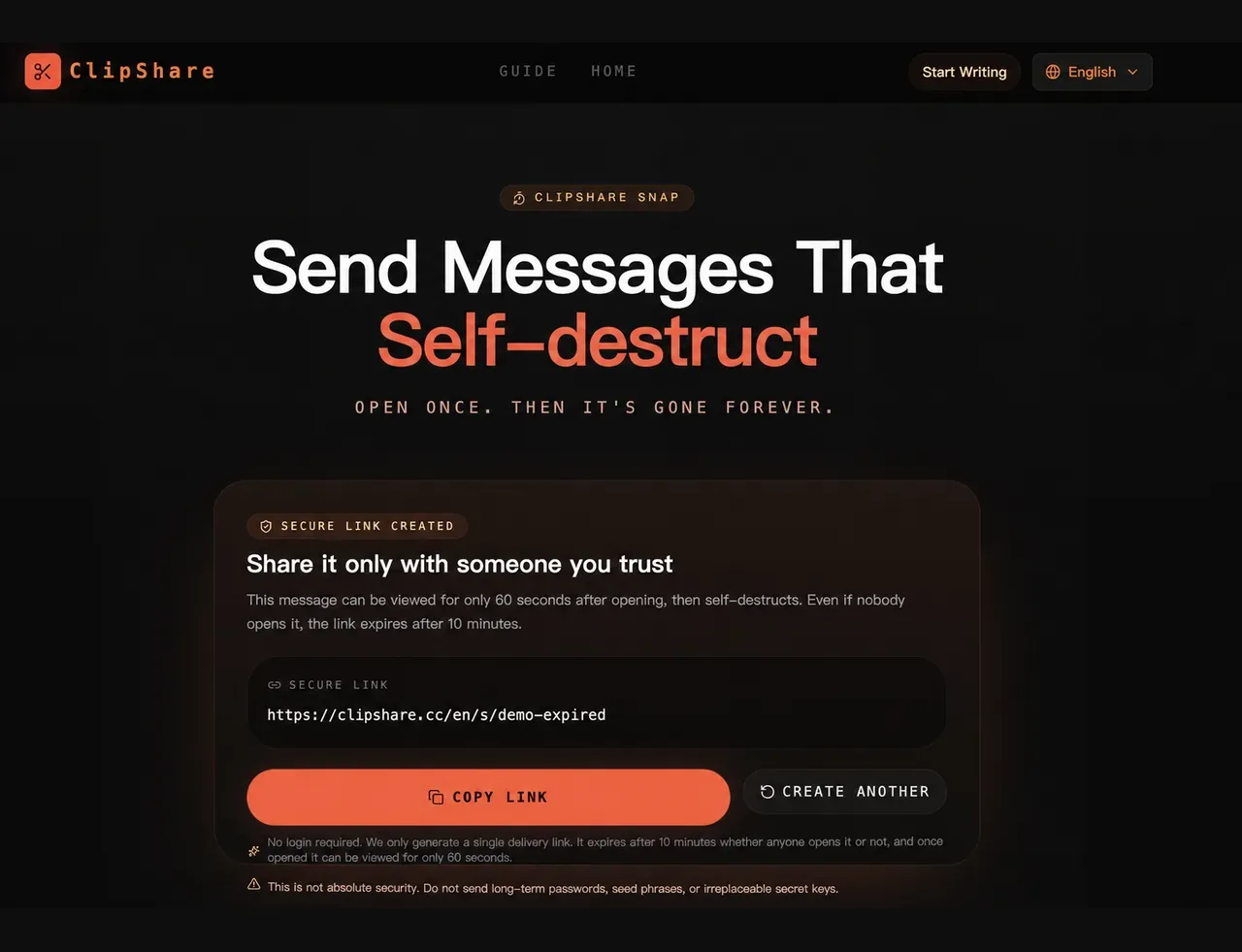
- the link expires 10 minutes after creation, even if nobody opens it
- the content is designed for one-time viewing
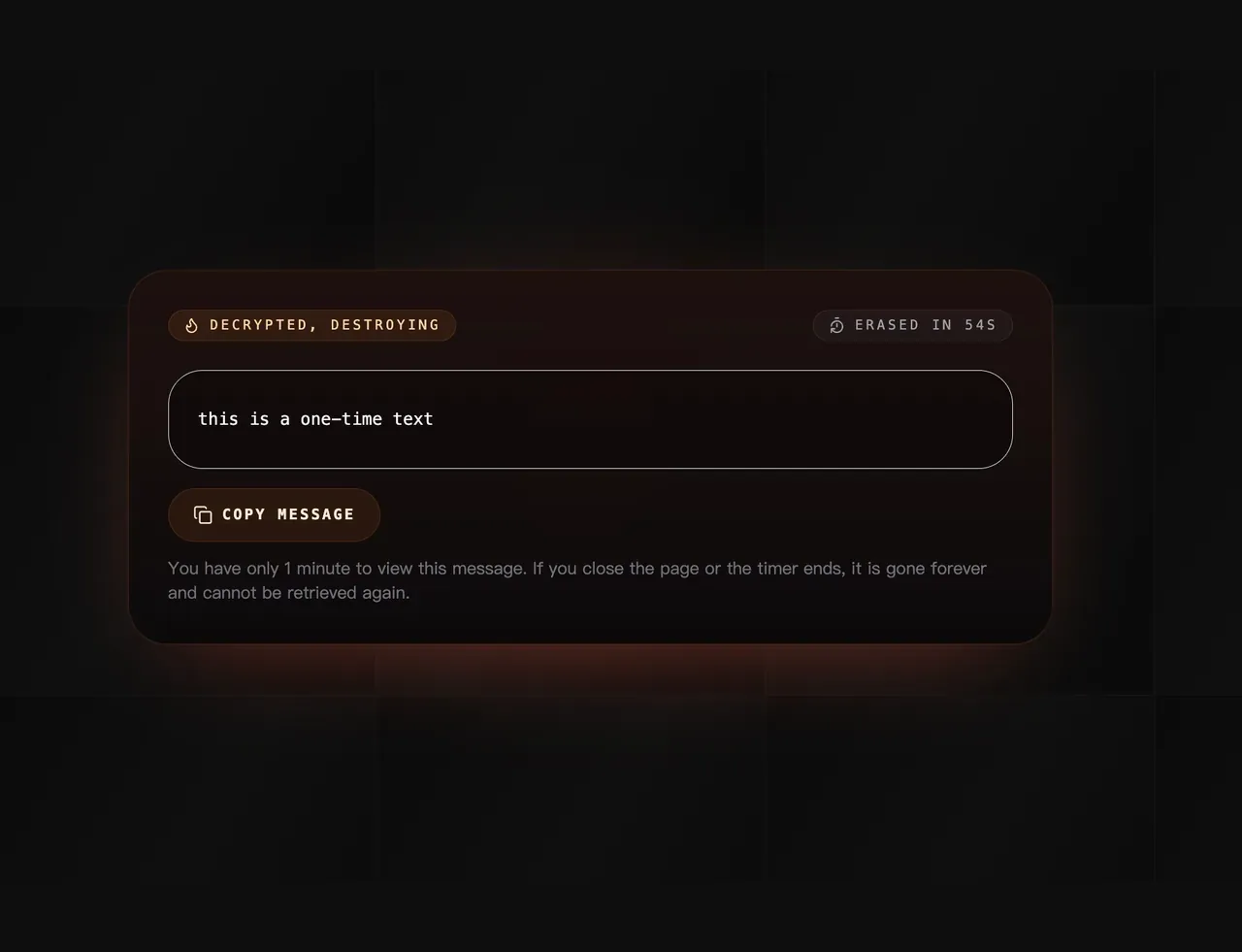
- once the message is revealed, there is only a 60-second reading window
- after the page is closed, the content cannot be fetched again
- no login is required
In other words, SNAP behaves more like a brief access window than a reusable inbox.
If you want to try it directly, start here:
Open ClipShare SNAP
How is SNAP different from normal sharing?
A lot of people first assume SNAP is just “a normal link with an extra rule.”
It is more different than that.
| Compare | Normal share | SNAP |
|---|---|---|
| Opening behavior | Often reusable | Built around one-time access |
| Lifetime | Usually longer | Automatically expires after 10 minutes |
| Reveal flow | Open and read immediately | Enter first, then actively reveal |
| After viewing | Often still accessible | The same link cannot show the original text again |
| Best for | General content and things you may revisit | Temporary, replaceable, short-lived information |
So SNAP is not simply a “stronger share link.”
It is a different model:
not meant for storage, but for one-time viewing.
What kind of content fits SNAP well?
SNAP works best when the content is:
- temporary by nature
- only needed once
- replaceable if necessary
- something you do not want sitting in chat history or email threads
Good examples include:
- temporary passwords or initial passwords
- short-lived internal notes
- quick login instructions
- brief private text that should not linger
- one-time coordination messages
The common pattern is simple:
the information matters, but only for a short window.
If the real need is “show this once without leaving it in a normal message history,” SNAP matches that job better than ordinary messaging.
What should not be sent through SNAP?
This matters more than the feature list.
Even with strict expiration and one-time viewing, SNAP is not an absolute-security channel.
Avoid using SNAP for:
- seed phrases, private keys, or recovery codes
- primary long-term passwords
- irreplaceable account credentials
- passport numbers or ID details
- bank or payment information
- high-impact confidential material that cannot be rotated or revoked
Why?
- anyone who sees the message can still take a screenshot or photo
- an unsafe recipient device is still an unsafe environment
- sending the link to the wrong person is still exposure, even if the window is short
If you are still judging whether a type of content belongs in a temporary sharing tool at all, this is the better next read:
Is Online Clipboard Safe? Privacy and Security Explained
What actually happens when you send a SNAP?
The easiest way to use SNAP correctly is to understand the lifecycle clearly.
1. You create the link
On the SNAP page, you enter the message and generate a one-time link.
2. The link starts expiring immediately
Whether anyone opens it or not, the link expires 10 minutes after creation.
That means SNAP is not a long-lived pickup box.
3. The recipient enters the viewing page
Opening the link does not instantly dump the message on screen.
4. The recipient actively reveals the message
Only after they choose to reveal it does the content appear, and then the 60-second reading window begins.
5. The window ends or the page closes
Once the viewing flow ends or the page is closed, the content cannot be fetched again.
That is the core expectation:
SNAP is not “hide it now and reopen it later.” It is “open it once, then it is over.”
Below is a real browser walkthrough of the current ClipShare Snap interface, completed with synthetic test text. The example link in the screenshots is no longer active and contains no real password or valid credential.
Link created for a short-lived message
Text revealed with the viewing countdown active
After the reveal flow ends
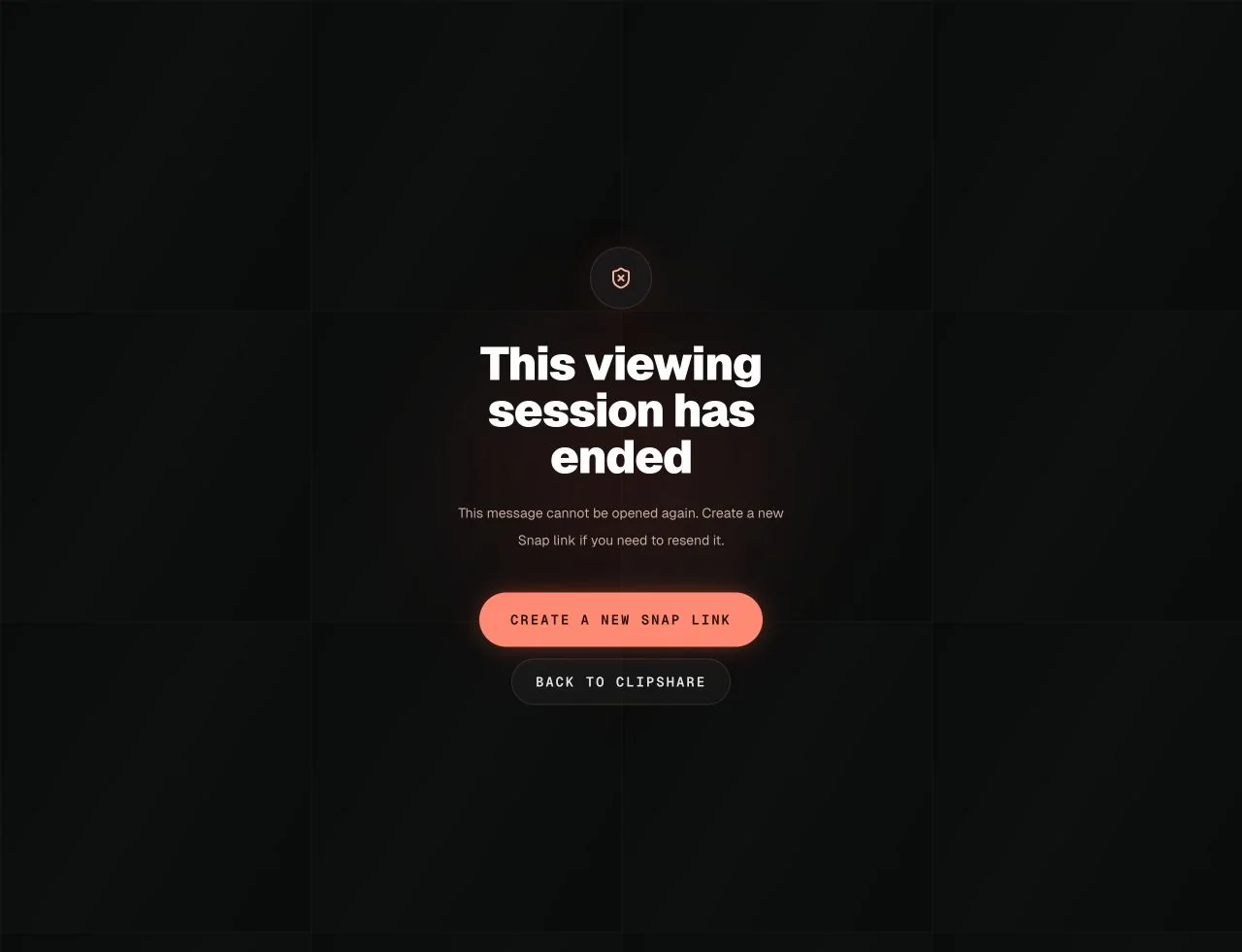
Verified on September 1, 2026: the link was created, the synthetic text was displayed, and the same link could no longer show the original text afterward.
Why SNAP is not “absolutely secure”
This boundary should be explicit.
SNAP can help you:
- shorten the lifetime of a message
- reduce long-term retention
- avoid repeated access
- keep temporary content out of normal chat history
But it cannot guarantee:
- that the recipient will not screenshot or copy it
- that the recipient device is clean or trustworthy
- that there is no recording, browser extension, or local monitoring involved
- that the link only reaches the intended person
So the more accurate framing is:
SNAP gives you short-lived exposure and minimal retention, not perfect secrecy.
If your concern is more about traces, logging, or whether temporary web tools can be monitored, continue with:
Can Online Clipboard Be Tracked or Monitored?
When should you use SNAP, and when should you use something else?
Use SNAP when:
- you need to hand off a short message once
- you do not want to log into another service
- you do not want a long chat or email record
- the content should expire quickly after viewing
Use another tool when:
- you need long-term storage
- multiple people need to revisit the same content
- the information is irreplaceable
- the workflow needs auditing, approvals, or historical tracking
If the real task is temporary cross-device transfer, normal ClipShare sharing may be more convenient.
If the real task is a one-time private text reveal, SNAP is the better fit.
A practical five-point checklist
If you are about to use SNAP, keep these five rules in mind:
-
Send only short-lived, replaceable information
Do not put irrecoverable secrets into it. -
Treat the link itself as the access credential
Send it only to the person who needs it. -
Tell the recipient to be ready before revealing
Once viewing starts, there are only 60 seconds. -
Do not treat SNAP as storage
It is designed to end quickly, not to archive anything. -
Use a more controlled channel for high-sensitivity material
Especially for permanent secrets, compliance-heavy data, or core credentials.
Use ClipShare Snap from a browser extension
If you create one-time private text links often, you can also install the separate ClipShare Snap browser extension.
The regular ClipShare extension is for selected webpage text and 10-minute temporary sharing. The Snap extension is narrower: when private text already appears on a webpage, you can select it, right-click, and create a one-view Snap link from that selection in Chrome or Edge.
Use the Snap extension when:
- you often turn selected webpage text into a one-time private link
- you want a dedicated Snap entry point without opening the full website first
- the text is still short-lived, replaceable, and appropriate for one-time viewing
The same safety boundary still applies: do not use the extension for seed phrases, permanent credentials, or irreplaceable secrets.
Frequently Asked Questions
Does a SNAP still expire if nobody opens it?
Yes.
Every SNAP link expires 10 minutes after creation, even if nobody clicks it.
Can I reopen it after closing the page?
No.
SNAP is designed so that after the viewing flow ends or the page is closed, the original content cannot be fetched again.
Is SNAP suitable for passwords?
Only for temporary and replaceable ones, such as an initial password or short-lived shared passphrase.
It is not appropriate for a long-term primary password, a seed phrase, or any irreplaceable secret.
If you are deciding whether a password is appropriate for a one-time link, continue with How to Share a Temporary Password with a One-Time Link.
Does SNAP require login?
No.
That is one of the reasons it works well for fast temporary sharing.
Conclusion
ClipShare SNAP is built for a very specific kind of job:
- the content is short
- it should be seen once
- it should not remain in long-term history
- the link should expire quickly
So it is best understood as a short-lived reading window, not a security vault.
If you already know the limits and the content is temporary, replaceable, and only needed once, SNAP is often a better fit than ordinary sharing.
You can start here:
- Open ClipShare SNAP
- View SNAP FAQ
- What Is a One-Time Private Link? When Short-Lived Secret Links Make Sense
- Is It Safe to Send Passwords in Chat? Temporary Passwords vs One-Time Links
- ClipShare Snap vs Snapchat: Which One-Time Message Flow Fits?
One-time viewing test and scope
On July 26, 2026, we tested SNAP in production Chrome with a synthetic 56-character message and no real password or personal data. The first clean browser context revealed the exact text; a second clean context received an unavailable response and could not retrieve it again.
This verifies the one-time behavior observed on that date. It is not an encryption audit, penetration test, recipient-identity check, endpoint-security guarantee, or protection against copying and screenshots. Until it is opened or expires, the complete URL remains a bearer secret and should be sent only to the intended recipient.
Security reference:
One-time text handoff
Create a Snap link for short-lived text
Use Snap when a temporary password, one-time note, or brief private instruction should be revealed once and then become unavailable from the same link.