How to Share Code Snippets Between Computers Without Login
Learn when a temporary browser handoff is more practical than Git, chat, or a shared document for moving non-sensitive code snippets between computers.
In this guide
There is a very common developer request that sounds small but happens all the time:
"Send me that snippet for a second."
It might be:
- a SQL query you want a teammate to test
- a
curlcommand you need on another machine - a JSON fragment from a doc page
- a long stack trace you want to inspect somewhere else
- a temporary config backup before you change something risky
None of those tasks feel important enough for a repository, a commit, or a permanent note.
But they still need to move from device A to device B quickly.
That is why code snippet sharing often feels heavier than it should.
Most tools are built for either:
- long-term storage
- formal collaboration
- or chat-driven conversation
Temporary snippet transfer sits in the middle, and that is exactly where lightweight browser sharing fits best.
Why sharing code snippets still feels awkward
Git and Gist are great, but usually too formal for one-off transfer
GitHub, GitLab, and Gist are excellent when you need:
- version history
- reviewability
- long-term storage
- repeatable reuse
But if you only want to move 20 lines of code to another device right now, the workflow is often heavier than the task itself.
GitHub’s official Gist documentation is also worth reading before using Gist as a privacy tool: a “secret” gist is excluded from discovery but is not private, and anyone with its URL can view it. Gist remains the better fit when you want a Git-backed artifact, history, or reuse.
Chat apps are convenient, but they pull the snippet into the wrong system
Slack, Discord, Telegram, WeChat, and similar tools feel easy because they are already open.
The tradeoff is that they often:
- mix temporary snippets into real conversations
- keep content far longer than necessary
- make later retrieval messy
- add formatting friction for code blocks
That does not make them bad tools. It just means they solve communication first, not temporary transfer first.
Old paste services still work, but they are not always a good daily workflow
Classic paste sites are useful, but many developers avoid using them as a default because they often feel:
- ad-heavy
- outdated
- more public than expected
- disconnected from normal day-to-day workflows
So the real problem is not a lack of tools.
It is a mismatch between the job and the category of tool being used.
What makes a good temporary code-sharing workflow?
For short-lived snippet transfer, most developers care about a smaller set of things:
- preserve indentation and line breaks
- work across different operating systems
- require no shared app ecosystem
- open fast in a browser
- disappear after the task is done
That is a different requirement set from:
- repository management
- permanent note-taking
- formal team communication
If your real goal is:
Move this snippet to another device, use it, and move on.
then the ideal tool is usually lighter than the ones developers default to.
Production check: Markdown and JavaScript through the real flow
On July 26, 2026, we tested the current production site in Google Chrome with this synthetic 92-character payload:
Stage 3A verification — 2026-07-26

```js
const relay = "ClipShare";
console.log(relay);
```
The sender received a 4-character code, QR code, and link. A clean browser context opened that link and recovered the exact payload, including the line breaks, backticks, quotes, and semicolons. The new share reported 600 seconds of remaining availability. The test logged no page exceptions, first-party request failures, or console errors.
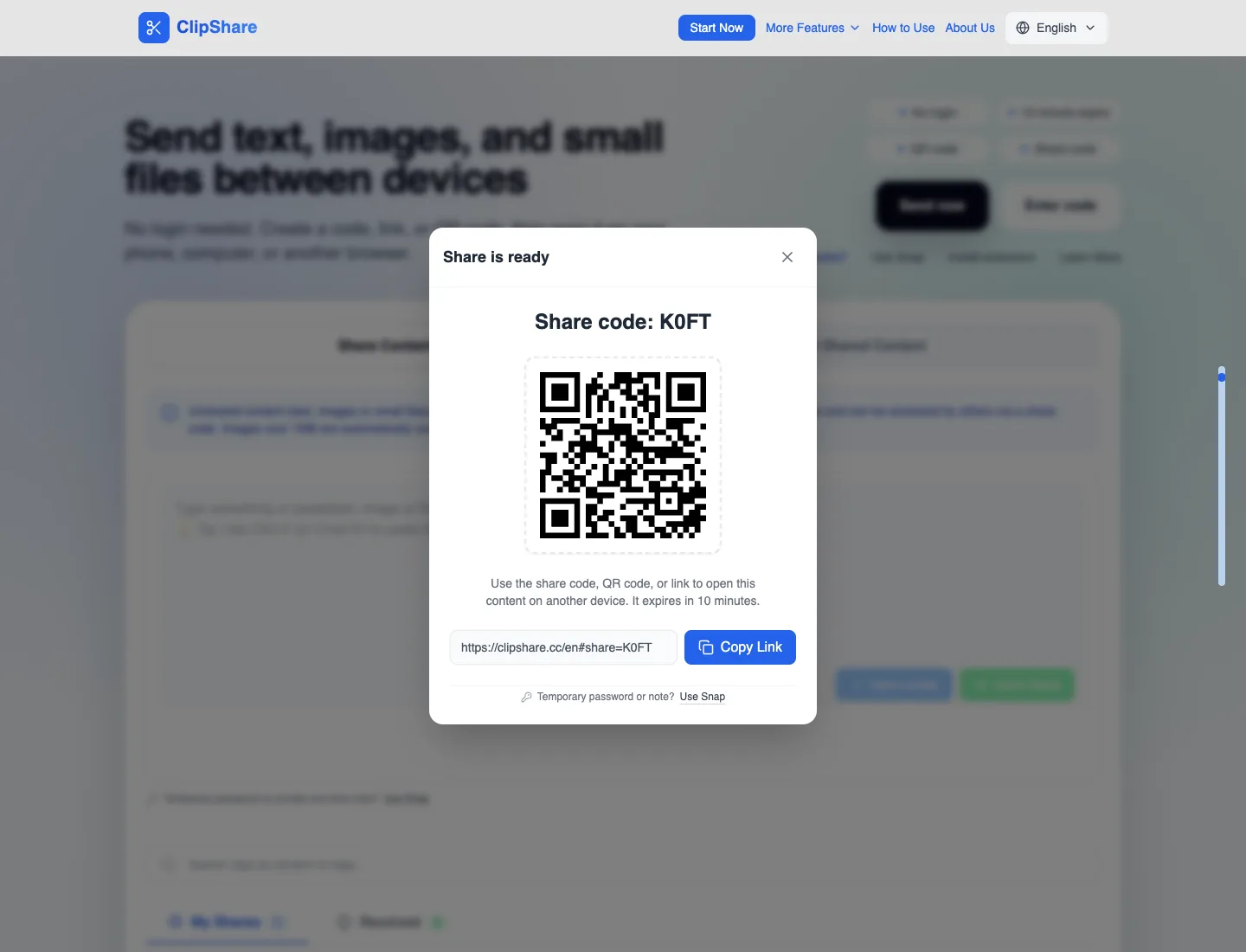
Sender: a temporary access code, QR code, and link were created.
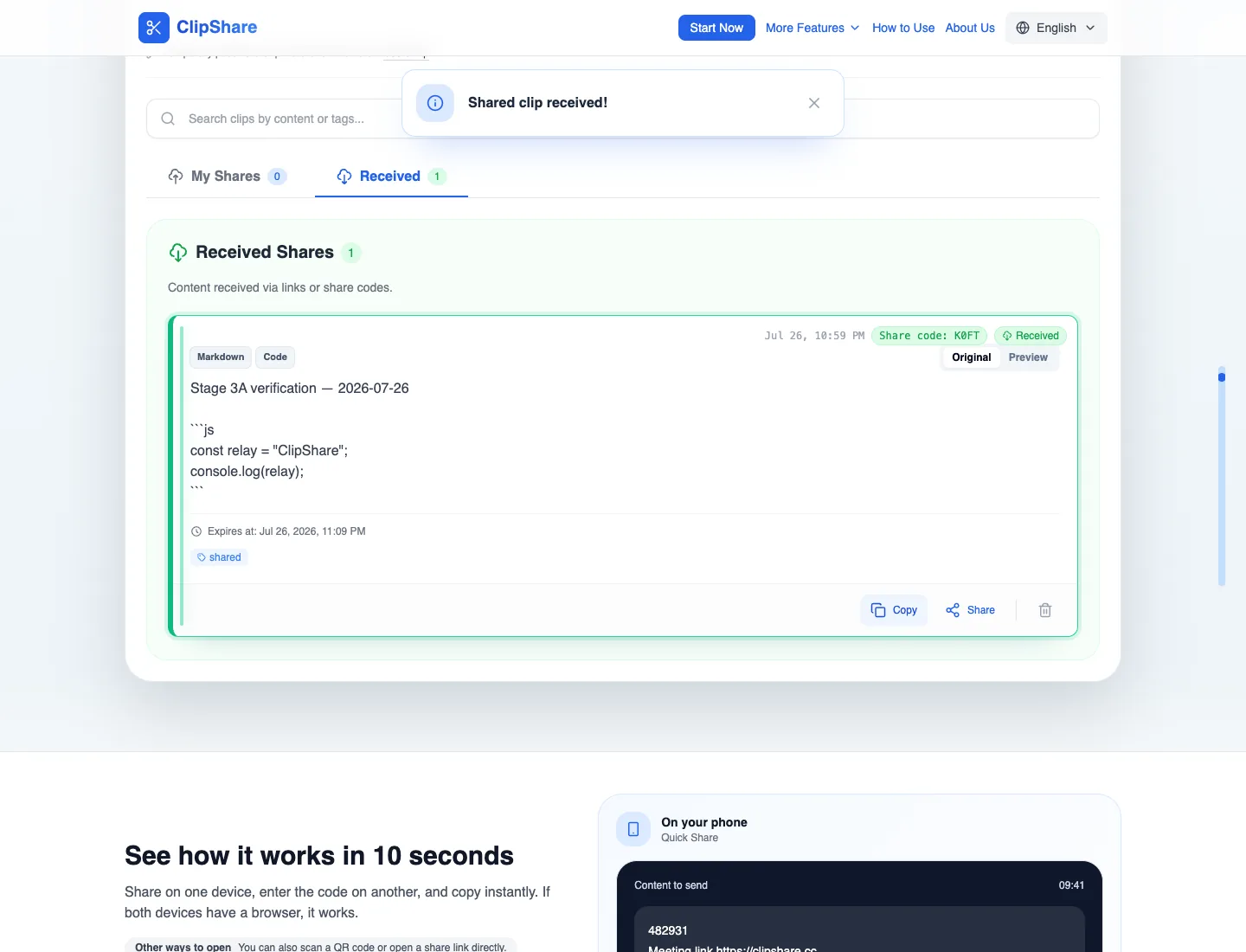
Receiver: the original Markdown and JavaScript characters are intact.
The pictured test share has expired. This check verifies one production path at one point in time; it is not an availability guarantee or a security certification.
The limit is just as important as the success result: anyone with an active code, link, or QR path can open the shared snippet before it expires. ClipShare is not an end-to-end encrypted secret manager, so remove tokens, credentials, private URLs, customer data, and other restricted material before sharing.
Why ClipShare fits this "just transfer it once" workflow
ClipShare is useful here not because it replaces Git, but because it reduces the cost of temporary movement.
1. It preserves plain-text structure without putting it in a chat thread
For code snippets, the failure cases are obvious:
- indentation breaks
- line spacing disappears
- special characters get mangled
- JSON or YAML becomes hard to read
In the production check above, the plain-text characters and line breaks were recovered exactly. That does not promise syntax-aware diffs or language parsing; use Git, an editor, or a dedicated review tool when those features matter.
2. It works across mixed devices
Real developer environments are rarely uniform.
You might be moving between:
- a Mac development machine
- a Linux test server console
- a Windows office laptop
- a phone or tablet you use for review
As long as each device can open a browser, the transfer stays simple.
That is the same broader pattern covered in Copying and Pasting Between Different Systems Is a Hassle? A More Universal Solution.
3. It keeps temporary snippets out of permanent collaboration channels
A lot of content does not deserve to become:
- a team message
- a shared document
- a saved gist
- a permanent artifact
It only needs to exist long enough for someone to open it elsewhere and continue working.
That is the exact boundary where temporary browser sharing is useful.
Four common developer scenarios where this is easier
1. Sharing stack traces or error logs
An app crashes and you get a 100-line trace.
What you usually need is not:
- a repository
- a polished report
- a long-lived chat record
You just need another person or another machine to see it immediately.
Typical flow:
- Open ClipShare
- Paste the log
- Send the share code or QR code
- Open and copy it on the other side
2. Moving commands and config fragments between machines
Examples:
- a
curlcommand from your Mac to a Linux box - a PowerShell snippet from one Windows machine to another
- a Docker or Nginx config fragment you need elsewhere for a quick check
If the task is temporary validation rather than formal deployment, a browser relay is often faster than sending messages to yourself.
3. Sending code examples from docs, forums, or AI tools to another device
This is a modern high-frequency workflow for developers.
Many snippets now come from:
- documentation pages
- issue threads
- Stack Overflow style discussions
- ChatGPT, Claude, Gemini, and other AI tools
If the snippet already lives on a webpage, the faster path is often the extension workflow covered in:
- ClipShare Browser Extension for Chrome and Edge
- Browser Extension vs Online Clipboard: Which Is Better for Sharing Text Between Devices?
4. Making a temporary copy of non-sensitive config before a quick edit
Sometimes you do not want to commit yet, but you also do not want to lose the original state.
That often happens with:
- Nginx config blocks
- Docker Compose fragments
- SQL queries
- JSON settings
Copying a non-sensitive fragment into a short-lived relay can give you a second copy during a quick edit, but it should never be the only rollback plan. For system changes, keep a local backup or version-controlled copy that will not expire.
How this compares with other common options
| Tool | Best for | Not ideal for |
|---|---|---|
| GitHub / GitLab / Gist | Git-backed sharing, version history, collaboration | One-time temporary snippets; secret Gists are not private |
| Slack / Discord / WeChat | Team communication | Temporary code transfer and formatting-sensitive content |
| Traditional paste sites | Public pastes and longer text sharing | High-frequency daily relay work |
| Carbon | Code screenshots and visual sharing | Copyable text transfer |
| ClipShare | Temporary sync, cross-device relay, quick viewing | Long-term archive or formal collaboration |
In practice, the most efficient workflow is usually:
- use Git for real code history
- use chat for actual discussion
- use browser relay tools for temporary snippet movement
The boundary matters: not every snippet belongs here
This part should stay consistent with the broader safety guidance.
Good fit:
- ordinary code examples
- temporary logs
- non-sensitive config fragments
- prompts
- shell commands without secrets
Poor fit:
- production secrets
- private keys
- recovery codes
- sensitive customer data
- confidential internal material that should not pass through third-party channels
GitHub documents secret scanning and push protection for supported repositories and content. A temporary clipboard is not a replacement for those controls, and the safest practice is still to remove secrets before any paste or share.
If you are evaluating the safety boundary rather than just speed, continue with Is Online Clipboard Safe? Privacy and Security Explained.
Frequently Asked Questions
Why not just use Gist for code snippet sharing?
Use Gist when you want a Git-backed artifact, revision history, or reuse. Use a temporary relay when you only need to move low-sensitivity text once. Remember that GitHub says secret Gists are unlisted rather than private, so neither option should be treated as a password vault.
Is sending snippets through chat apps good enough?
Sometimes, yes. But over time it clutters conversations, keeps temporary content longer than necessary, and often handles formatting less cleanly than a dedicated relay workflow.
Is ClipShare suitable for logs and config fragments?
Yes, for ordinary, temporary, low-sensitivity logs and config snippets that you want to continue working with on another device.
Is it suitable for production secrets or confidential configuration?
No. High-sensitivity material should go through more controlled channels, not temporary sharing just because it is convenient.
What if the code is already on a webpage?
Then the extension workflow is usually faster, especially if you often grab snippets from docs, forums, or AI tools.
Conclusion
For developers, the friction in snippet sharing is usually not that there are no tools.
It is that:
- formal tools are too heavy
- chat tools are too noisy
- temporary transfer is more common than people admit
So the better division of labor is usually:
- Long-term storage and versioning: GitHub, GitLab, Gist
- Visual code sharing: Carbon
- Instant relay and temporary cross-device movement: ClipShare
The next time someone says, "send me that snippet," and the task is just a short transfer rather than formal collaboration, a browser-based temporary relay is often the simplest answer.
Related Articles
- Copying and Pasting Between Different Systems Is a Hassle? A More Universal Solution
- Browser Extension vs Online Clipboard: Which Is Better for Sharing Text Between Devices?
- ClipShare Browser Extension for Chrome and Edge
- ClipShare Now Supports Small File Sharing
- Is Online Clipboard Safe? Privacy and Security Explained
- Complete ClipShare Guide - From Beginner to Expert
Want to try first?
Open ClipShare and move something in a few seconds
Paste text, add an image, or upload a small file, then open it on another device with a share code, link, or QR code.